
A new feature has been added to parts orders to allow users to mark goods as onsite, without having to receive the order.
Often the goods will arrive, but it may be a couple of days before the invoice is received. This causes an issue for the workshop, as they want to know which parts are onsite, but can’t receive them into stock as the final price is not yet known.
Goods In Process
Within a parts order there is now a button at the top of the Order ‘Goods In‘. When the parts arrive onsite, they can be marked as goods in by entering the quantity of parts that have been delivered.
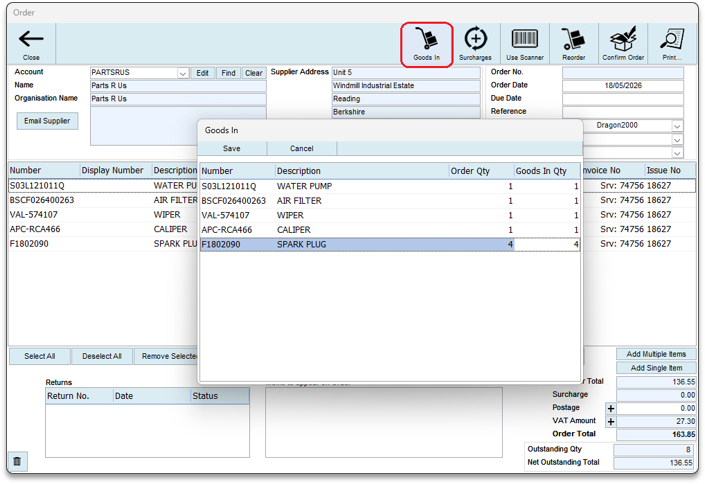
Entering the goods in quantities doesn’t receive the order, and therefore the pricing can still be edited when the invoice is received.
Parts Status Updates
When a parts order has been raised for a job, the parts status will initially show as turquoise, indicating the parts are on order and not yet onsite.

When parts arrive on site and the Goods In quantities are entered, if there are now sufficient parts to fulfil the job, the parts status will update to green, indicating the parts are onsite.
Updating pricing and receiving the order
When the suppliers invoice is received, users can go into the part order and edit the unit prices to match the suppliers invoice. Then, as before, highlight all the lines on the order and click on the Receive Selected button.
It is this action that will record the unit price of each part, and will mark the order as ready to post to Sage50 the next time the Sage integration is run.
Reporting
Parts marked as Goods In, where the parts order hasn’t been received will be listed at the end of the Stock Value report.
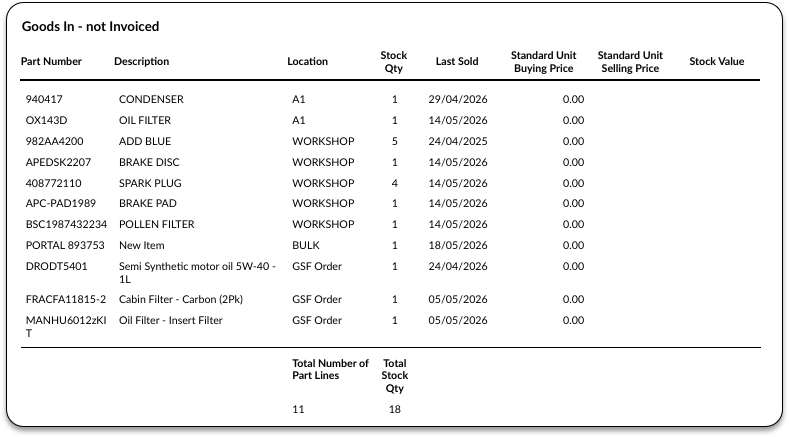
New feature added to DragonDMS v26.0018